Free Residential Construction Schedule Template
A schedule for remodels and new homes, built by a residential superintendent who's still in the field. The trades are already in order. Type your start date and every date fills in, skipping weekends and holidays.
Download free: Excel file · Printable PDF · No email needed.
Missing a task you always schedule? Email support@danoriapp.com.
What's in it
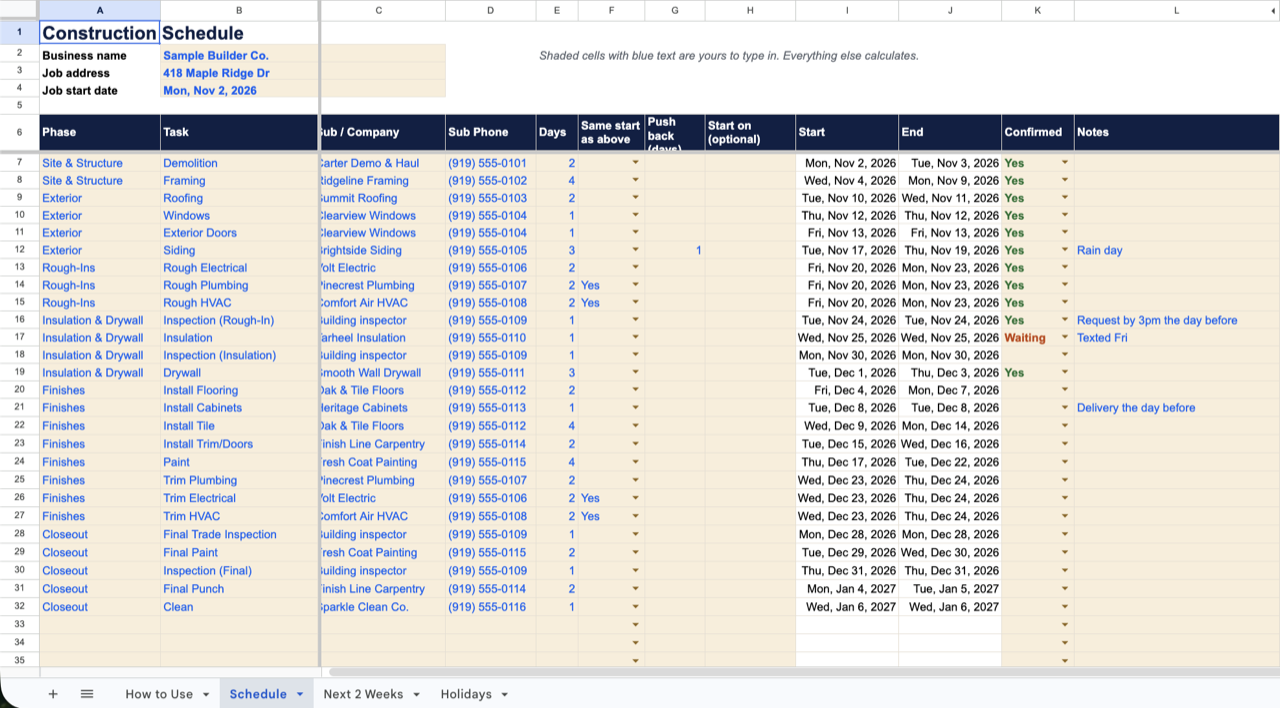
- Schedule: 26 tasks from demo to final clean, grouped by phase. Days, subs, phone numbers, and a Confirmed column for each one.
- Dates that keep up: change the days on one task and everything after it moves.
- Push back: a rain day or a late sub? Type the days and the rest of the job shifts.
- Same start: trades that work the same days, like the rough-ins, start together.
- Next 2 Weeks: only what's coming up, with each sub's phone and status, so you know who to confirm.
- Holidays: a list you can edit. Those days get skipped.
How to use it
- Type the job start date at the top of the Schedule tab.
- Set the days for each task. The days in the file are placeholders, so use what your subs tell you.
- Add your subs and their numbers.
- When something slips, type the days under Push back. To pin a task to a date, type it under Start on.
- Check Next 2 Weeks every week and confirm whoever is coming up.
To move a task, drag its row to the new spot and the dates update. Sharing with a client? Hide the sub and phone columns first.
The order of trades
The template follows the order most residential jobs run in. Change it to fit yours.
- Site and structure: demo, then framing.
- Exterior: roofing, windows, exterior doors, and siding, so the house is closed in.
- Rough-ins: electrical, plumbing, and HVAC, often on the same days.
- Insulation and drywall: rough-in inspection, insulation, insulation inspection, then drywall. Inspections come before anything covers the walls.
- Finishes: flooring, cabinets, tile, trim and doors, paint, then the plumbing, electrical, and HVAC trim-outs.
- Closeout: final trade inspection, final paint, final inspection, punch list, and clean.
The tasks that hold up the most work are the ones to confirm first: framing, the rough-ins, and anything waiting on an inspection.
Where Danori fits
A spreadsheet can do the date math. It can't text your subs, keep track of who answered, or tell you who still hasn't confirmed. That part is still on you, on every job.
Danori is an iPhone app for builders running jobs on their own. It keeps your schedule, subs, job costs, and client updates in one place, with job templates built in. Danori texts each sub their task, date, and address to confirm. They reply Y, N, or R, with nothing to download. When a sub asks to reschedule, one tap sends your open dates, they pick one, and you approve it.
Try Danori free for 30 days, no card to start.