Free Construction Change Order Form
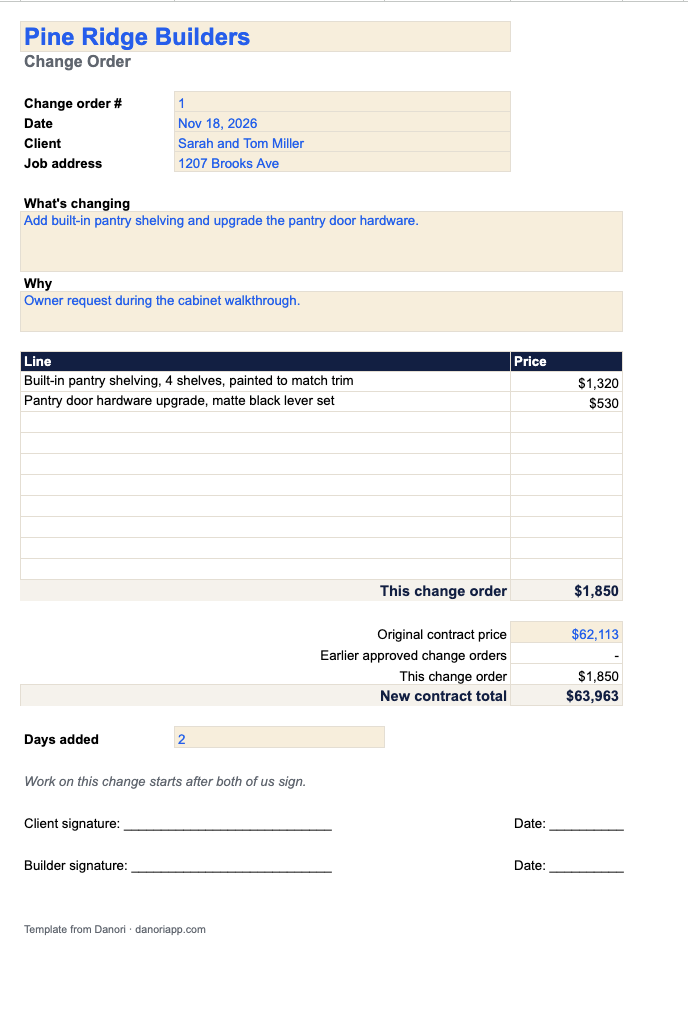
When the client asks for something new, get it in writing before the work starts. Price the change, show the new contract total and the days it adds, and get both signatures on one page.
Download free: Excel file · Printable PDF · No email needed.
Missing something you always put on a change order? Email support@danoriapp.com.
What's in it
- Change Order: the page the client signs. What's changing, why, each line with its price, the days it adds, and the new contract total.
- Your pricing, kept to yourself: type your cost and markup on the Pricing tab. The client only sees the price.
- Contract total that adds itself up: the original price, earlier approved changes, and this one.
- Change Order Log: every change on the job with its amount, days, and status. Approved ones add up for you.
- Printable PDF: a blank form to fill in by hand when the client asks on site.
How to use it
- On the Pricing tab, type your markup and each line of the change with your cost.
- On the Change Order tab, fill in the number, date, client, job, what's changing, why, and the days it adds.
- Type the original contract price once. Earlier approved changes come in from the log.
- Print it or save it as a PDF, and get it signed before the work starts.
- Add it to the Change Order Log and update the status when the client answers.
What every change order should have
- A number and a date, so you can point to it later.
- What's changing, in plain words. Specific enough that nobody remembers it differently a month from now.
- Why it's changing, like a client request or something found once the walls were open.
- The price, and the new contract total with it.
- Days added to the schedule, even if it's zero.
- Both signatures, before the work starts.
Where Danori fits
A paper change order works until there are five of them across three jobs. Then you're digging through the truck for the signed copy, and adding up the contract total by hand.
Danori is an iPhone app for builders running jobs on their own. It keeps your estimates, schedule, subs, and job costs in one place, and every change order lives with its job, marked pending, approved, or declined. An approved change order can't be deleted, only credited, so the record stays straight. The project update you share with the client shows the contract total with approved changes included.
Try Danori free for 30 days, no card to start.

FAQ
This isn't legal advice. Check what your state requires in a written change order.