You're the only system your jobs have.

Danori is an iPhone app that keeps every job, sub, and dollar in one place, so none of it lives only in your head.

Try Danori Free for 30 Days

QR code to download Danori on the App Store

On desktop? Scan to download.

iPhone app. No credit card required.

Danori dashboard with Today's jobs and Top priorities

You already know how this goes.

Every schedule is in your head. Who's coming tomorrow. What got pushed. What the client's waiting on. Whether the job's actually making money.

Construction software was built for companies with an office. You're running this out of your truck.

So your system became texts, a notebook, a few spreadsheets, and whatever you can remember at 9 PM.

That works, until it doesn't.

Know what's happening on every job

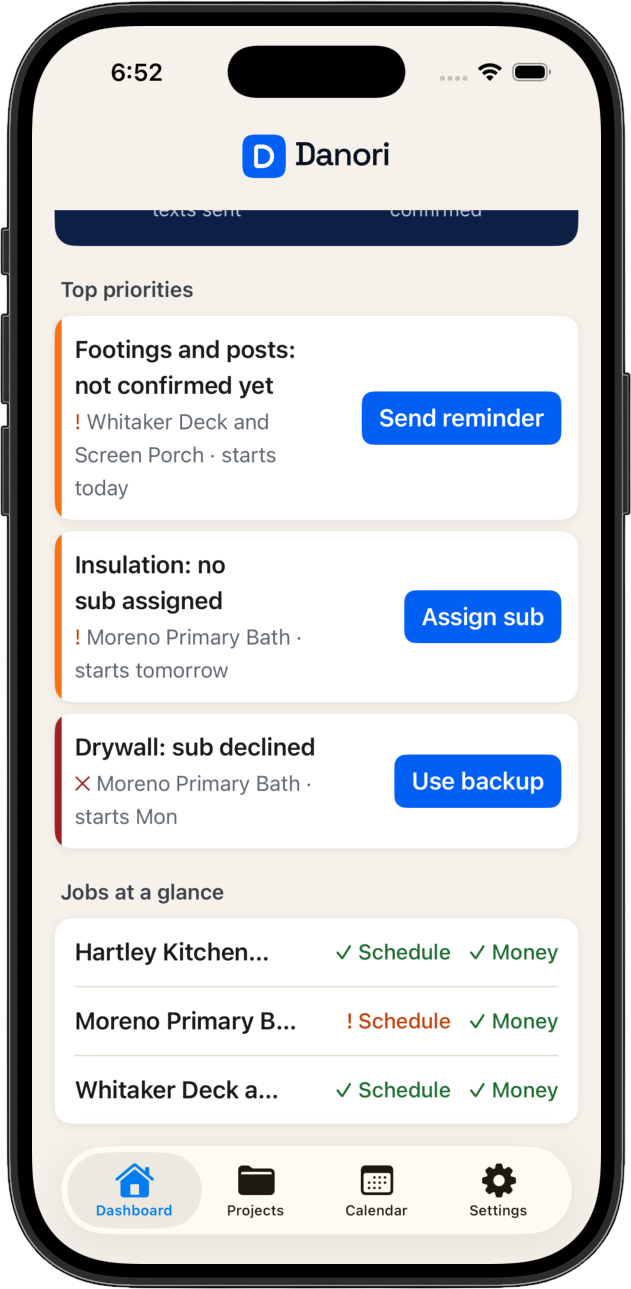
Open the app and see where everything stands.

  • Today panel: who's on site and whether they confirmed.
  • Top priorities show only what needs you. A sub who hasn't confirmed, a task with nobody on it, a job running over.
  • Every job shows on track, at risk, or behind, with the reason next to it.
  • One calendar for every job. Tap a day to see who's on site.
✓ On track ! At risk × Behind
Danori dashboard showing Top priorities and Jobs at a glance Danori calendar with a day selected, who's on site, and whether they confirmed

Know what you're making. Before the job's over, not after.

Most builders find out what a job made after it's done. You see it while it's running.

  • Price the job with task costs, materials, markup, and contingency.
  • Log real costs as tasks finish. Danori shows what's left in contingency and the profit you're on track to keep, in plain numbers.
  • Change orders take seconds to make. Once approved, they go straight into the job's price and profit, so the "no problem" you said on site doesn't get lost. If one sits with the client for more than two days, you get a flag.
Contingency left
$0
Profit you'll keep
$0

On this job, you'll keep $3,880 instead of $4,680. Cabinets ran over the most.

Project details with contingency and profit gauges Estimate screen showing client price and what you keep Change order screen that rolls a new item into the job price

Keep clients in the loop without the 9 PM texts

Clients want to know where things stand. Give them a page that always shows it.

  • Each homeowner gets their own progress page. No login.
  • They see percent complete, week X of Y, what's happening this week, what's next, and the expected finish date.
  • A timeline of the job's phases shows what's done, what's happening now, and what's coming up.
  • You pick which photos they see. Add one to a task, turn on sharing, and it shows on their page by week. Nothing shows until you say so.
  • No money shown, just where the job stands.
Client page showing job progress, 58% complete, this week's work, and what's coming up, with no money Client page showing what's coming up, project phases with one marked happening now, and a shared photo of the cabinets, with no money shown

Your subs don't download anything

Your subs already know how to reply to a text. That's all they have to do.

Danori texts each sub before their task starts. They reply Y to confirm, N to decline, or R to reschedule. No app, no login, nothing to install.

Confirmed subs get reminders 2 days and 1 day before.

If someone says no, one tap puts your backup in and texts them.

Move a task and Danori offers to text every sub it affects with the new date. You decide. It sends.

Every builder gets a local Danori number based on where you work, so the texts come from a number that looks local.

Not another Buildertrend

The big names were built for a team to set up, train everyone on, and keep updated. You're one person.

Danori is built for 1 to 10 jobs, run from your phone. It shows you what needs you today, not everything it knows.

Questions

They don't download or log into anything. They get a text and reply Y, N, or R. If someone says no, you put in your backup with one tap.
Usually that's because it took an office to run it. Danori isn't a pile of settings to get through first. You add your subs, start a job from a template, and the first screen shows what needs you. Your subs don't have to learn anything.
A spreadsheet holds your numbers. It doesn't text your subs, track your profit while the job runs, or give the homeowner a page with progress and photos. Danori does. Keep the spreadsheet for anything else you use it for.
Add your subs from your phone contacts and tag their trades. Start your first job from a template (Remodel, Flip, or Addition), one of your own, or from scratch. Your usual job lengths and subs fill in on their own. You set it up once. Your subs never have to.
Small Operator is $99 a month or $990 a year, up to 5 active jobs. Large Operator is $149 a month or $1,490 a year, unlimited jobs. Both start with a 30-day free trial, no credit card required.

Stop being the only system your jobs have.

Try Danori free for 30 days and see what it's like to run a job without carrying all of it in your head.

Try Danori Free

iPhone app. No credit card required.