Free Construction Estimate Template
Price every line of the job with your markup, add contingency, and send the client a clean estimate that never shows your costs. Works in Excel and Google Sheets.
Download free: Excel file · No email needed.
Missing a line item you always price? Email support@danoriapp.com.
- Markup you need
- Price
- Profit
- Margin you actually make
Margin has to be under 100%.
What's in it
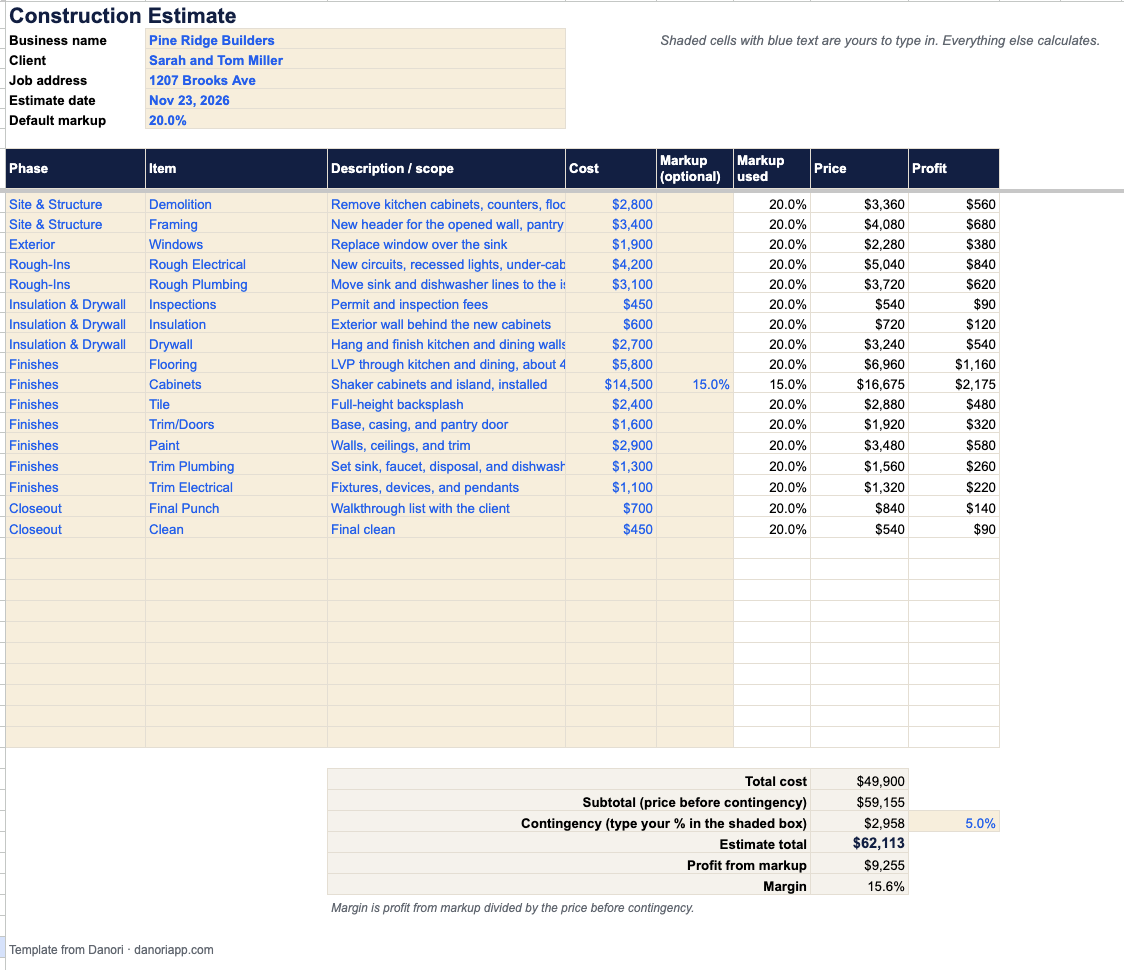
- Estimate: 23 line items from demo to final clean, grouped by phase. Type your cost and the price fills in.
- One markup for the whole job: set it once at the top. Change it on any single line.
- Contingency: type a percent and it's added to the total.
- Profit and margin: see what the job makes before you send it.
- Client Estimate: every line with its description and price, plus the total and an approval line. Your costs and markup never show. Print it or save it as a PDF.
- Markup calculator: works from a markup or from the margin you want.
How to use it
- Fill in your business name, the client, and the job address at the top of the Estimate tab.
- Type your default markup. It applies to every line.
- Type your cost and a short description for each line. The description is what the client reads.
- Add a contingency percent at the bottom if you use one.
- Delete any line that isn't part of the job, then send the Client Estimate tab.
Markup vs. margin
Markup is what you add on top of your cost. Margin is the share of the price you keep. They're not the same number, and mixing them up means making less than you planned.
Say a job costs you $10,000 and you add a 20% markup. The price is $12,000 and you keep $2,000. That $2,000 is 20% of your cost, but only 16.7% of the price. So a 20% markup is a 16.7% margin.
If you want a 20% margin, you need a 25% markup. The calculator at the top of this page works it out both ways.
| Markup | Margin |
|---|---|
| 10% | 9.1% |
| 15% | 13.0% |
| 20% | 16.7% |
| 25% | 20.0% |
| 30% | 23.1% |
| 50% | 33.3% |
Where Danori fits
A spreadsheet gets the estimate out the door. Once the client says yes, the numbers stay in that file while the job runs somewhere else, and you're left typing everything in twice.
Danori is an iPhone app for builders running jobs on their own. It keeps your estimates, schedule, subs, and client updates in one place. Price each line with your markup and contingency, and send the client a clean PDF. When the client approves, the costs carry straight into the job, and Danori shows what that job is on track to make as it goes.
Try Danori free for 30 days, no card to start.